






If you've ever needed to add GPS coordinates to a folder of photos, or strip them out before posting online, you already know most "geotag" tools are either abandoned, paywalled, or a pain to use. We tested the real options for Windows in 2026 and ranked them honestly. Short answer up top: our pick is Geo Tag. But the full breakdown, including where the alternatives win, is below.
Full disclosure before we start: Geo Tag is our own app, built by Lucky Panda. We're not going to pretend the others don't exist or invent fake flaws. Everything in this comparison is verifiable, and we'll point out exactly where the competition is genuinely good. You can judge for yourself.
What Makes a Geotag App Actually Good?
Before the rankings, here's the criteria we used. Not all geotag tools are trying to do the same thing, so it matters what you're optimizing for:
- Batch speed. Can it tag hundreds or thousands of photos at once, or is it one file at a time?
- Add AND remove. The best tools both write GPS (for organization) and strip it (for privacy). Most only do one.
- Format support. JPEG is easy. Real RAW support (Sony ARW, Canon CR3, Nikon NEF) and modern iPhone HEIC is where tools separate.
- Privacy. Does it process locally, or upload your photos to a server? For a privacy tool, this is non-negotiable.
- Price and limits. Free with no caps, free-but-limited, or paid?
- Active maintenance. Is it still being updated in 2026, or has it quietly died?
With that framework, here's how the field stacks up.
#1: Geo Tag (Our Pick)
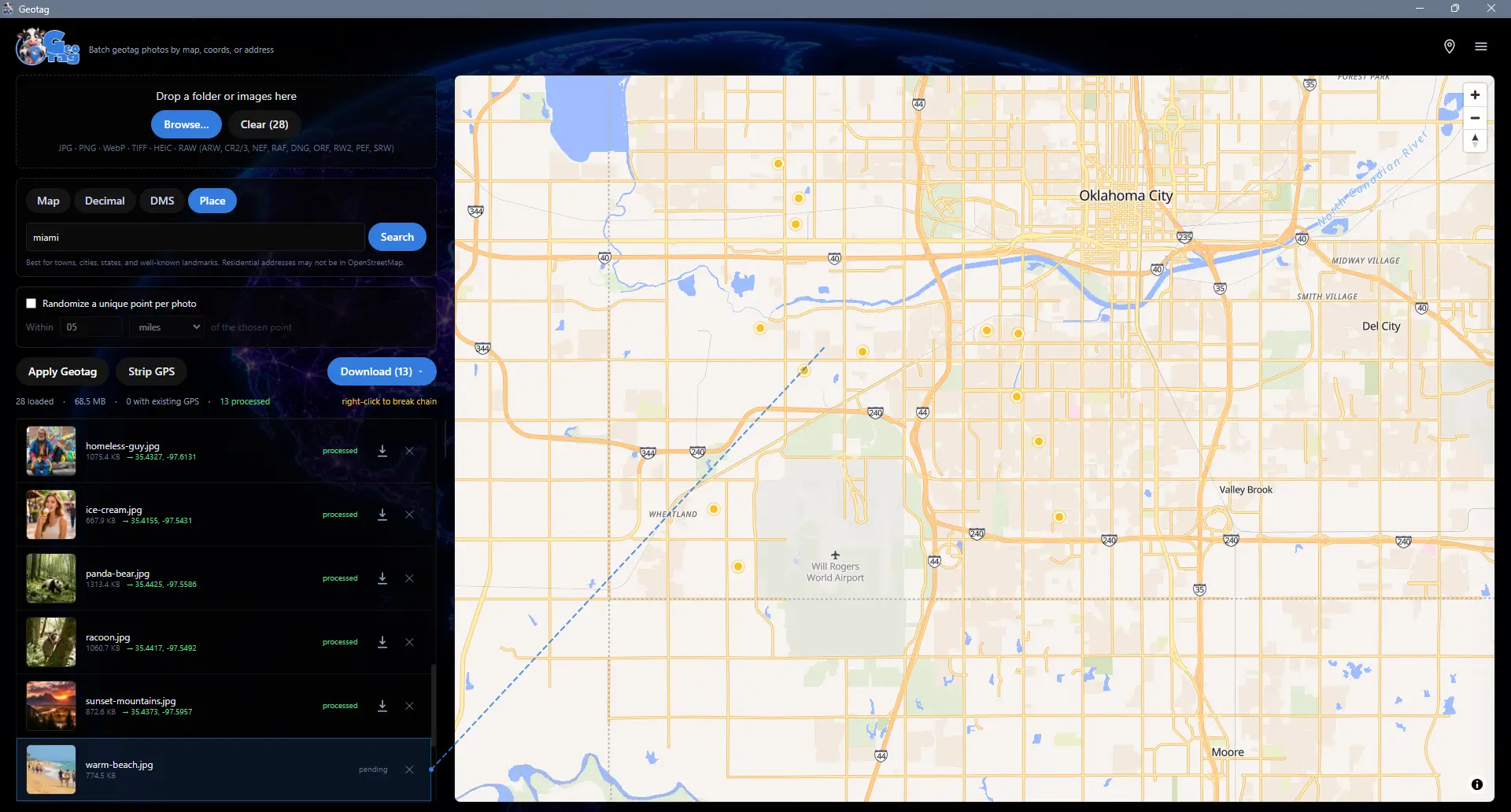
Yes, it's ours. But it earns the top spot because it's the only tool here that does the whole job: add, remove, randomize, and reverse-geocode, in bulk, across every modern format, 100% offline, for free, with no caps.
The core workflow is dead simple. Drop a folder onto the app, click a single point on the world map, and that coordinate is applied to every photo at once. Need precision? Switch to per-image mode and click each photo individually, and auto-advance moves you through a shoot one click at a time. You can pick a location four ways: click the map, type decimal coordinates, paste degrees-minutes-seconds, or type an address and let the built-in geocoder fly to it.
Where Geo Tag pulls ahead of everything else on this list:
- It strips metadata too. "Strip GPS" removes just the location while keeping camera and exposure data; "Strip ALL Metadata" wipes EXIF, XMP, IPTC, MakerNotes, and the ICC profile entirely. One app for tagging and privacy.
- Randomize in radius or in view. Scatter a unique coordinate for every photo inside a radius you set, or uniformly across whatever the map is showing. No other tool here does this.
- Town, state, and country in the filename. Reverse-geocode each photo and rename it
IMG_2204_Marble_Falls_Texas.jpg, so it's self-documenting with no metadata reader required. - Full RAW out of the box. Sony ARW, Canon CR2/CR3, Nikon NEF, Fujifilm RAF, Adobe/Pixel/Leica DNG, Olympus ORF, Panasonic RW2, Pentax PEF, and Samsung SRW, plus JPG, PNG, WebP, TIFF, HEIC, and HEIF. ExifTool is bundled, so there's nothing to install separately.
- Photoshop round-trip + folder cleanup. Bake coordinates into filenames so they survive an editor that strips EXIF, then re-apply them in one click. And the "Clean up no-GPS photos" tool trims giant folders before upload.
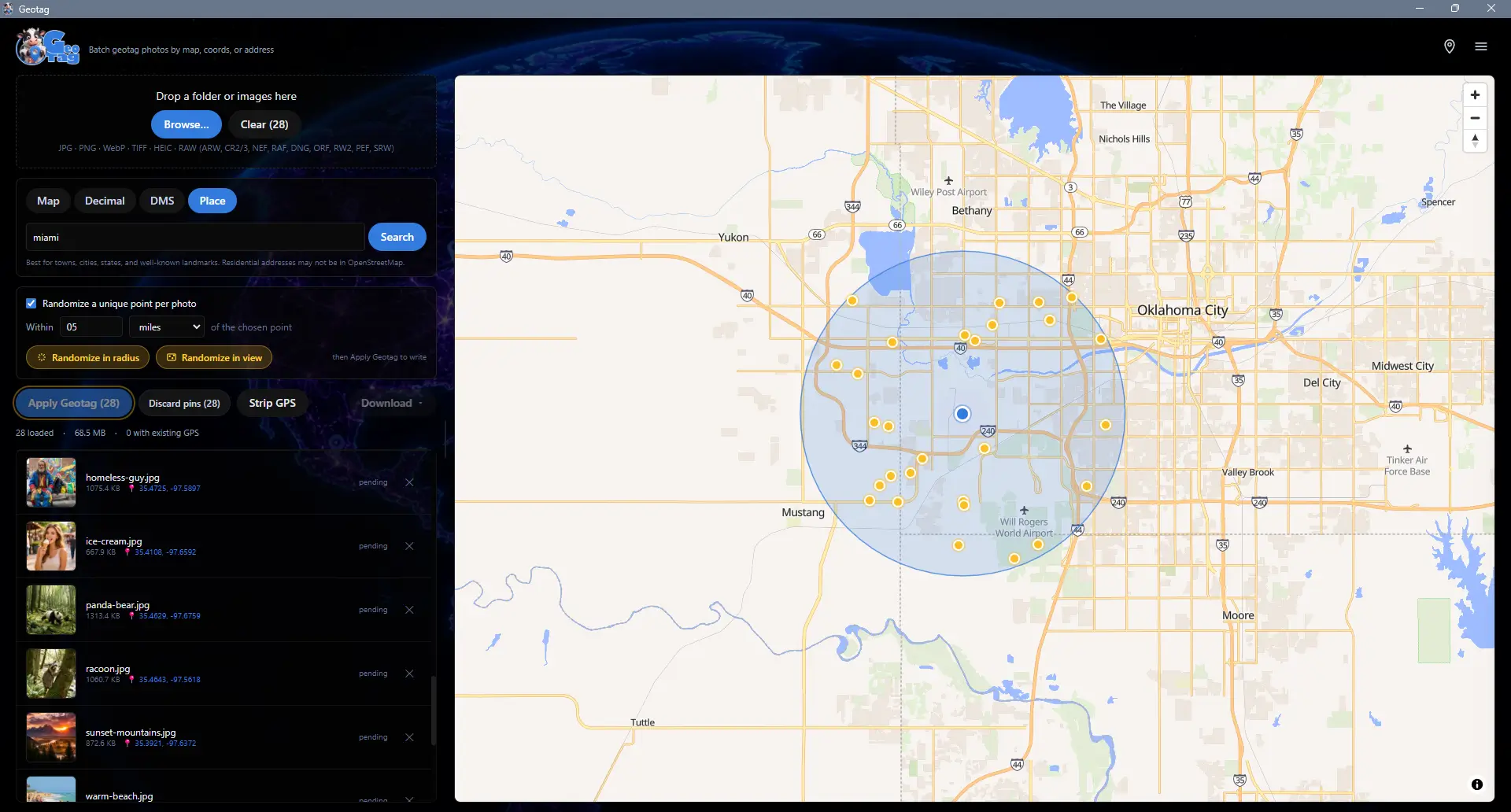
It's non-destructive by default (your originals are never touched until you hit Download), has a five-step undo stack, and processes everything locally. The only network calls are for map tiles and optional address lookups, and your photos never leave your machine. It runs on Windows 10 (version 19041 / May 2020 Update) or newer.
The catch: it's Windows-only, and it's the new kid. It launched in 2026, so it doesn't have a decade of forum posts behind it yet. If you live on macOS or Linux, this isn't your tool.
Geo Tag is free on the Microsoft Store.
#2: PhotoLocator
If you want a free, open-source alternative and your workflow is built around GPS track logs, PhotoLocator is genuinely good and deserves the runner-up spot.
It does lossless JPEG geotagging, supports both manual map-based tagging and automatic timestamp-based syncing, and can import GPX and KML track files to match photos to where you were at a given moment. For someone who carries a GPS logger on hikes or shoots, that track-sync workflow is excellent, and the price is unbeatable: free and open-source.
Where it falls short of Geo Tag:
- RAW needs extra setup. Out of the box it handles JPEG. To save geotags to RAW and other formats you have to download ExifTool separately and point the app at it. Geo Tag bundles that engine.
- No metadata stripping. It's a tagger, not a privacy tool. There's no one-click "remove all metadata before posting."
- No randomize, no filename geocoding. The convenience features that speed up stock and privacy workflows aren't there.
- Track-first UI. If you just want to click a map and tag a folder, it's more tool than you need, and the interface reflects its GPS-logger heritage.
Bottom line: the best free option if you geotag from GPS tracks and only work in JPEG. Geo Tag is the better all-rounder.
#3: GeoPhoto
GeoPhoto is the most polished photo-map viewer on this list. It turns your folders into an interactive map of where every shot was taken, works across Windows, Mac, and mobile, and looks great doing it. If your main goal is visualizing a library on a map, it's lovely.
The problem is the pricing model for actual geotagging. The free version is capped at 10 geotagging operations and 1,000 photos/videos. To get unlimited geotagging, GPS track import, and automatic tagging you need GeoPhoto Pro (a one-time purchase). That's a perfectly fair business model, but it means the free tier isn't a real batch-tagging tool. It's a trial.
- Free tier is a preview. 10 geotag operations won't get you through one real shoot.
- Pro is required for the batch and track features most people come for.
- No metadata stripping or randomize. It's built for viewing and tagging, not privacy.
Bottom line: a beautiful cross-platform photo-map app, and the only multi-platform option here. But for unlimited batch geotagging you'll pay, where Geo Tag is free with no caps.
#4: GeoSetter
For years, GeoSetter was the answer to "what's the best free geotag app for Windows." It's powerful, with a deep metadata editor that old-school photographers still swear by. We're including it because its reputation means people still search for it, but we have to be honest about its state in 2026.
GeoSetter is essentially no longer maintained. Its last meaningful update was back in 2020, and development had stalled well before that. Worse, its map feature relied on Google Maps, and when Google changed its API pricing in 2018, the integration started showing "for development purposes only" watermarks. On modern Windows it can be finicky, and it leans on dated browser technology under the hood.
- Abandoned in practice. No active development, no forecast for the long-promised version 4.
- Broken/limited maps due to the Google API change.
- Compatibility friction on current Windows versions.
Bottom line: a legend, and still usable for some, but it's running on fumes. If you're starting fresh in 2026, you want something actively maintained.
Honorable Mention: GPicSync
GPicSync is a free, open-source tool that, like PhotoLocator, is built around correlating photos to a GPS tracklog by timestamp. It's been around a long time and still works, but the interface shows its age and it's squarely aimed at the GPS-logger crowd rather than people who just want to click a map and tag a folder. Worth knowing exists; not where most people should start in 2026.
Quick Comparison
| App | Batch tag | Strip metadata | RAW built-in | Price | Maintained |
|---|---|---|---|---|---|
| ★ Geo Tag | Yes | Yes (GPS + all) | Yes | Free, no caps | Yes (2026) |
| PhotoLocator | Yes | No | Needs ExifTool | Free | Yes |
| GeoPhoto | Pro only | No | Partial | Freemium | Yes |
| GeoSetter | Yes | Partial | Yes | Free | No (since ~2020) |
| GPicSync | Yes (track) | No | Needs ExifTool | Free | Minimal |
How to Choose
Here's the quick version by use case:
- Want one app that does everything (tag, strip, randomize, RAW, free, offline)? Geo Tag.
- Geotag from a GPS tracklog and only shoot JPEG? PhotoLocator is a great free choice.
- Need it on Mac too, and mostly want to view photos on a map? GeoPhoto (expect to pay for unlimited tagging).
- Nostalgic for GeoSetter? It still runs, but it's not maintained, so go in with eyes open.
The Bottom Line
The geotag space is full of tools that do one slice of the job. Taggers that can't strip. Strippers that can't tag. Free tools that died years ago, and slick ones that wall the real features behind a purchase. Geo Tag is our attempt to build the one that does all of it: add coordinates by clicking a map, randomize them, strip them for privacy, geocode them into filenames, handle every RAW format, and never send a single photo off your machine.
Grab Geo Tag free on the Microsoft Store and tell us what you think. And if you're cleaning up photos for the web while you're at it, pair it with our MooCrunch image compressor or read our guide to compressing images without losing quality. Want to understand the EXIF data all of this is editing? Our history of the JPEG breaks down where it came from.
Sources: PhotoLocator (GitHub), GeoPhoto (Microsoft Store) and GeoPhoto FAQ (free-tier limits), GeoSetter changelog (last updates), GPicSync (GitHub). Geo Tag is built and maintained by Lucky Panda Websites; it uses ExifTool, MapLibre, OpenFreeMap, and OpenStreetMap Nominatim. Competitor details accurate as of June 2026.
Ready to Build Something?
Let's talk about your project and see how we can help.
Schedule a Consultation